
In our previous exploration of the strategic shift toward the infinite sales floor, we established that AI agents are the primary drivers of sales scaling in 2026. But strategy without execution is just overhead. To move from theory to revenue, you need to know how to actually build these agents. By combining HubSpot’s rich CRM data with n8n’s powerful orchestration engine, any growth-focused business can deploy an autonomous sales force that works while the team sleeps.
-Mar-25-2026-08-48-39-9524-AM.png?width=2000&height=1128&name=Velocity%20Blog%20Featured%20Images%20(3)-Mar-25-2026-08-48-39-9524-AM.png)
Table of Contents
The Architecture: HubSpot + n8n
Step 1: Setting the High-Intent Trigger
Step 2: Building the Agent Logic in n8n
Step 3: Giving the Agent its "Hands" (Tools)
Step 4: The CRM Write-Back Loop
Native Agents vs. Custom Builds
FAQ

The Architecture: HubSpot + n8n
To build a functional agent, you need three things: Context (Who is this prospect?), Reasoning (What should I say to them?), and Execution (Where do I send the message?).
In this guide, we use HubSpot as the memory and context provider. We use n8n—a low-code workflow automation tool—as the environment where the AI actually "thinks" and acts. Unlike standard automations that follow a rigid "If This, Then That" logic, an n8n AI Agent node uses an LLM (like Claude 4.5 or GPT-4o) to decide which tools to use based on the instructions you provide. If you are new to the world of middleware, it’s worth seeing how API integrations connect your business systems before diving into agentic workflows.
Step 1: Setting the High-Intent Trigger
An agent shouldn't be running constantly on every cold lead; it should be triggered by intent. In HubSpot, create a Workflow based on a specific trigger, such as:
- A Contact's "Lead Score" exceeding 80.
- A "Hand-raiser" action (e.g., requesting a case study).
- A specific "Lifecycle Stage" change.
Once the trigger criteria are met, use the "Trigger Webhook" action in HubSpot. This sends the Contact ID and Company ID to a specific URL generated by your n8n workflow. This is the "tap on the shoulder" that tells the agent it’s time to go to work.
Step 2: Building the Agent Logic in n8n
In n8n, you will drag in an AI Agent Node. This node is the "brain." You need to configure three sub-components within it:
The System Prompt
This is where you define the persona. A good sales agent prompt looks like this: "You are a Senior SDR at Velocity. Your goal is to research the provided Contact and Company to find one specific business challenge they are facing. Use your tools to look at recent news and LinkedIn posts. Draft a 3-sentence outreach email that is helpful, not salesy."
The Model
Select your LLM. For sales outreach, we recommend Claude 4.5 Sonnet for its superior nuance in writing or GPT-4o for its speed in data processing.
The Memory
Add a Window Buffer Memory node. This ensures that if the prospect replies, the agent "remembers" the previous research it did, preventing it from repeating itself or losing context.
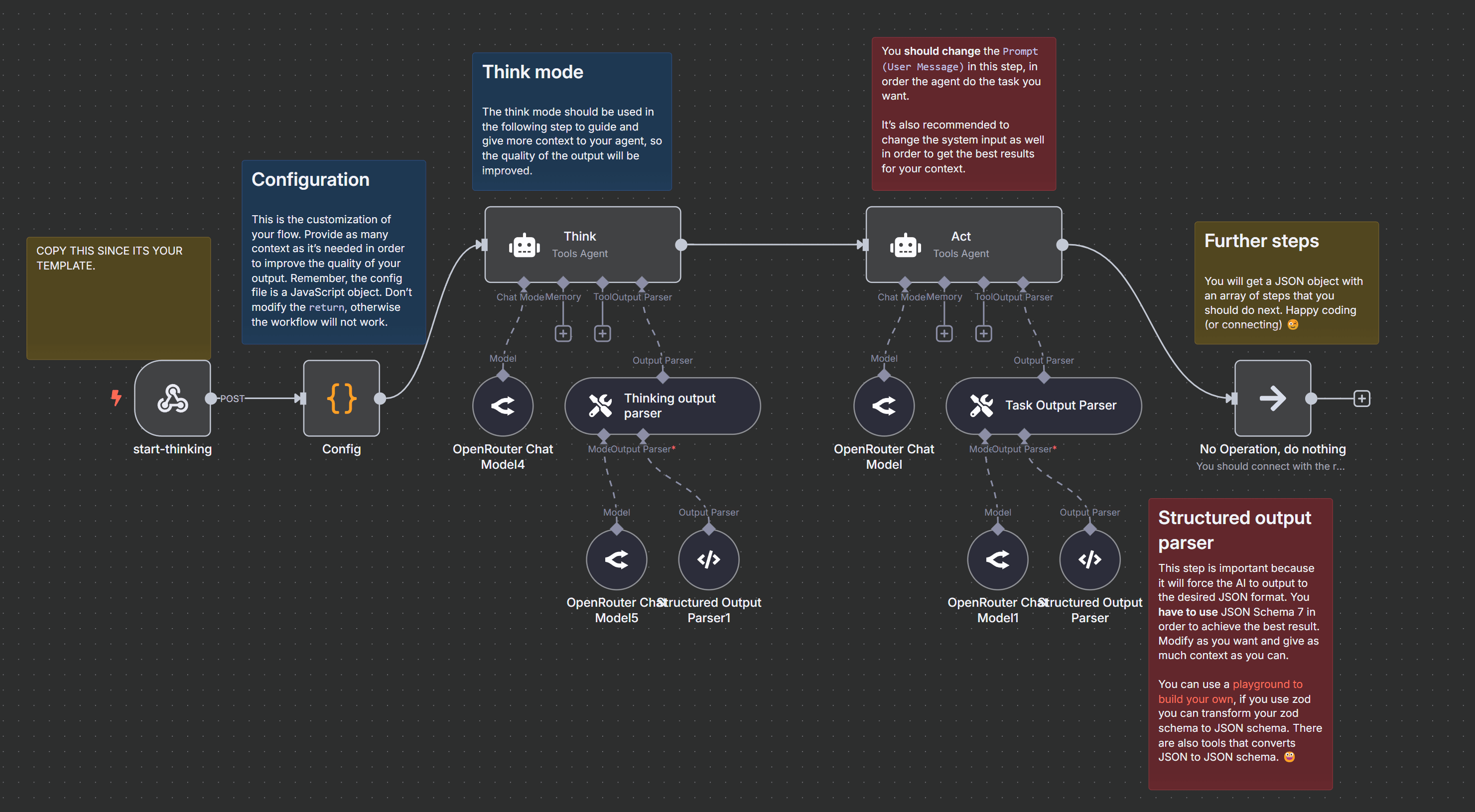 Building AI Agents with Think-Plan-Act Architecture
Step 3: Giving the Agent its "Hands" (Tools)
A "Chatbot" just talks; an "Agent" does things. In n8n, you attach Tools to your Agent node. For a sales agent, you should include:
- HubSpot Tool: To "Read" the latest notes on the contact record.
- Google Search Tool (SerpApi): To find recent press releases or "buying signals" about the company.
- HTTP Request Tool: To scrape the prospect's website for their mission statement or product list.
When the agent runs, it doesn't just guess. It says, "I need to know what this company does," triggers the Search Tool, reads the results, and then drafts the email.
Step 4: The CRM Write-Back Loop
The final step is getting the agent's work back into HubSpot. You don't want the AI to just send emails autonomously until you trust it. Instead, have n8n:
- Update a Custom Property: Create a "Research Notes" field in HubSpot and have the AI write its findings there.
- Create a Draft Task: Have the agent create a Task for the Account Executive that includes the drafted email text.
- Slack Notification: Send a message to the #Sales-Alerts channel saying, "Agent has finished researching [Company Name]. Click here to review the draft."
Native Agents vs. Custom Builds
It’s important to note that you don't always have to build from scratch. HubSpot has introduced native capabilities that handle the heavy lifting of data management. Understanding how HubSpot’s Breeze data agent drives growth is essential for any team looking to keep their CRM clean without manual entry.
However, for Outbound Orchestration—where you need to connect to external scrapers, LinkedIn, and proprietary databases—the n8n "Custom Agent" approach provides the flexibility that native tools cannot yet match. The best "Agentic Stack" usually involves using Breeze for internal data hygiene and n8n for external prospect engagement.
FAQ
How much does it cost to run an n8n agent?
n8n is significantly more affordable than hiring a full-time SDR. A typical agentic workflow might cost a few cents per lead in "tokens" (the cost of the AI thinking) plus the monthly subscription for n8n and your research tools (like SerpApi). For most companies, the ROI is realised within the first 50 qualified leads.
Do I need to be a coder to use n8n?
You don't need to be a software engineer, but you do need to understand "logic flows." n8n is a visual tool; if you can build a complex HubSpot Workflow, you can learn to build an n8n Agent. The "low-code" aspect comes in when you want to customise the data being passed between steps.
Is my data safe when sending it to an AI agent?
When using n8n and HubSpot, you have control over what data is sent to the LLM. You should never send sensitive information (like passwords or financial data). Most enterprise LLM accounts (like OpenAI Enterprise or Anthropic via AWS Bedrock) ensure your data is not used to train their public models.
How do I start?
Start small. Don't try to build an agent that handles the whole sale. Build a "Research Agent" first. Its only job is to find one interesting fact about a company and put it in a HubSpot note. Once that works perfectly, give it the "hands" to draft an email.